Microscopy & microtechniques
Published over 15 years ago. See the latest and most current information on Microscopy & microtechniques.
nnovative LIMS developer, Two Fold Software Ltd, has enhanced the interface design and user friendliness of the Run Manager software module of its Qualoupe next generation of LIMS solution to enable users to rapidly setup queues of samples to be processed through a specific laboratory instrument for a given method. “All good LIMS have a Run Manager capability but for many the process is fiddly and slow to operate. In line with our intuitive user
interface we have strived to make the creation of these runs simple,” explained Paul Bateman, Two Fold Software’s Business Development Manager. “The user only has to select the instrument and method upon which the system will show the available samples to be processed. The solution also identifies any QC related samples associated with the method.”
With Qualoupe’s Run Manager solution the QC related samples can be recorded and coded as a number of types such as calibration, control, reference, and standards. The actual samples and any QC samples can then be placed into the queue in the appropriate positions.
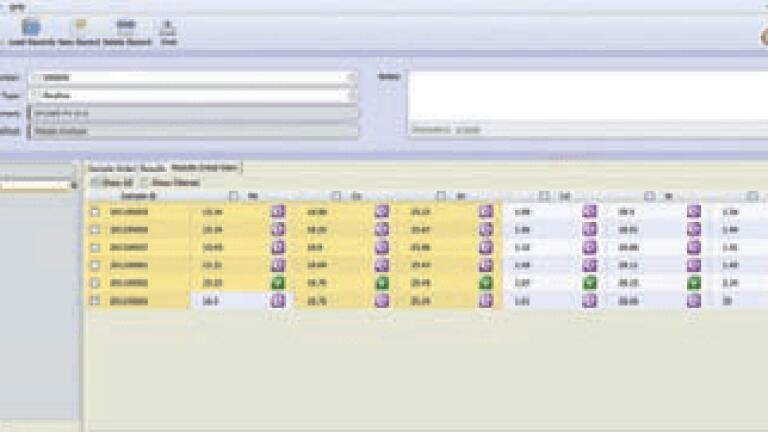
“Once the run has been processed through the laboratory instrument the results are automatically acquired and the samples updated with the results,” explained Bateman. “With most LIMS that is the end of the process, however we found when discussing the users requirement prior to creating this application many users wanted to be able to review all of the results for the run and also be able to filter the results by sample, result parameter and results status. “So we created a dynamic cross tab view which displayed the samples processed in rows with each result parameter being displayed in columns. The solution means that irrespective of the number of samples or results parameters a cross tab can be formed and if the samples and results parameters exceed the screen size, scroll bars appear to enable the results to be navigated more easily. The cross tab view is a remarkable tool for reviewing sample results for the run.”Qualoupe Run Manager is designed to filter the data by using simple one click checkboxes, which gives valuable flexibility to the view. The cells are also colour coded to indicate the results status. White is in specification, amber is out of specification but are non failing result parameters while red represents a failing results parameter that is out of specification. The actual status is also displayed. By clicking on the status a user is able to view any specification attached to the result, the full audit trail, sample status history and any remarks.
ILM 51.6 Sept 2026



 Product directory























.jpg)